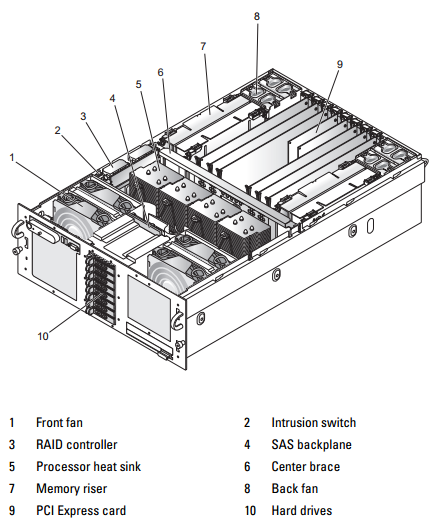
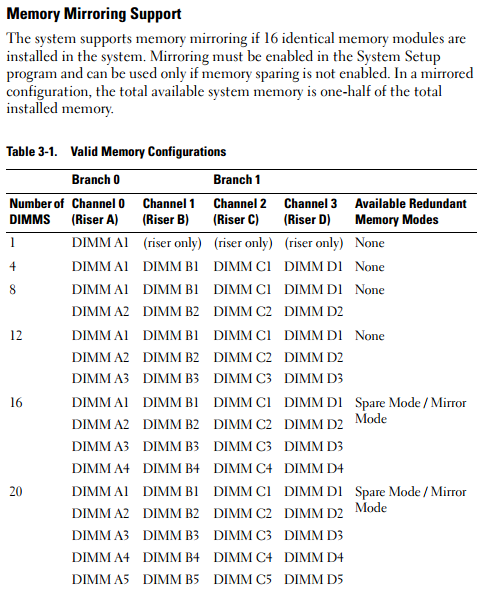
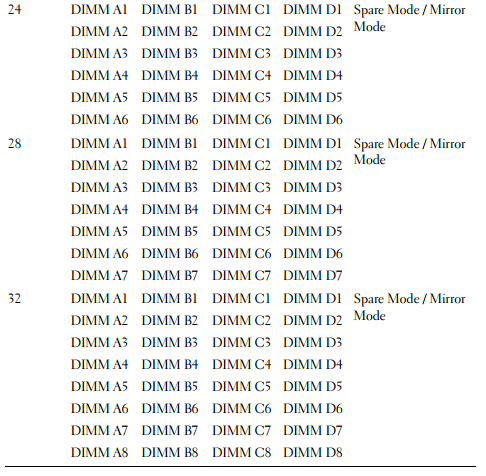
The system supports x4 or x8, single- or dual-rank fully buffered 667 MT/s (5-5-5 latency) DDR2 DIMMs in 512 MB, 1 GB, 2 GB, or 4 GB packages.
Four memory risers must be installed at all times. The risers connect to the main board through x16 PCI Express connectors.
General Memory Module Installation Guidelines
AC power must be removed from the system before servicing the memory risers.
NOTICE: For proper cooling, each memory riser must be fully populated with
DIMMs or blanks or a combination thereof.
Four memory risers with one DIMM per riser must be installed for the server to function.
Supported memory riser configurations are as follows:
• All DIMMs must be FBD using DDR2 DRAMs (FBD Generation 1).
• In all cases, DIMMs must be installed starting with the lowest number slot in a given channel (i.e., install DIMM1 first).
• In non-Mirrored Mode, all DIMMs with the same slot number within a given branch must match (size, technology, etc.). It is not required to match DIMMs between different slot numbers.
• Mirrored mode requires the same DIMM type across and up-and-down channels.
• In Single Channel Mode, a DIMM must be populated in the Branch 0, Channel A, DIMM 1 slot first, then you can populate the Channel A up to all 8 DIMMs.
• For the Dual Channel Mode, the memory capacity upgrade path would be to populate Branch 0 of Channel A and Channel B with the same DIMM number and type, or Branch 1 of Channel C and Channel D with the same DIMM number and type.
Non-Optimal Memory Configurations
System performance can be affected if your memory configuration does not conform to the preceding installation guidelines. Your system may issue an error message during startup stating that your memory configuration is non-optimal.
The server will support a population of DIMMs with different speed ratings. The overall system memory speed will be determined by the slowest DIMM populated.
The server will support population of mixed memory suppliers, provided all other rules above are followed.
Memory Sparing Support
The system supports memory sparing if eight identical memory modules are installed in the system. The memory sparing feature must be enabled in the System Setup program and can be used only if memory mirroring is not enabled.
Memory sparing allocates four ranks of DIMM memory to the spare bank. These four ranks consist of the first rank of memory in DIMM sockets 1 through 4. For single-rank DIMMs, the entire capacity of the four DIMMs is allocated to sparing whereas for dual-rank DIMMs, only half of the four-DIMM capacity is allocated to sparing. Table 3-1 shows how memory sparing splits the available and spared memory in each of the single- and dual-ranked memory module combinations.
_________________ MemoryToday.com โทร.084-959-9000
Update ราคาล่าสุด!! สอบถามเพิ่มเติม/ขอใบเสนอราคา โทรมาหาเราสิครับ!!
ผู้จำหน่าย RAM, SSD, HDD & Upgrade Parts สำหรับ Server อันดับ 1 ของประเทศไทย !!
RAM and SSD -> Server, Workstation, Apple Mac, Notebook, Desktop PC : Server Options -> Processor, Memory, SAS HDD, Storage Controller, Power Supply, Spare Part
MemoryToday Co., Ltd. 7 IT-Mall Fortune Town Bldg., 3rd Floor, Room 3R22, Ratchadapisek Rd., Dindaeng, Bangkok 10400 Tel: 02-641-0055 Fax: 02-641-0066 Web site engine's code is Copyright by PHP-Nuke. All Rights Reserved. PHP-Nuke is Free Software released under the GNU/GPL license.


 คำถามถามบ่อยของกระดานข่าว
 ค้นหา
ค้นหา รายชื่อสมาชิก
 ข้อมูลส่วนตัว
 เข้าระบบ