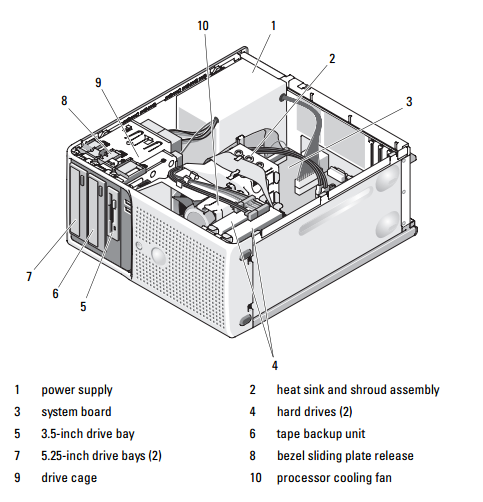
The four memory module connectors on the system board can accommodate from 512 MB to 8 GB of 667-MHz and 800-MHz unbuffered ECC DDR II single or dual-rank memory modules. See Figure 6-2 for the location of the four memory module connectors.
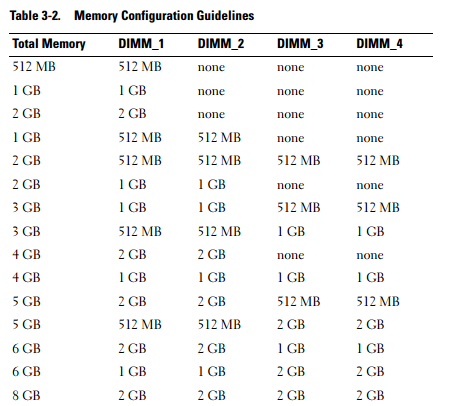
NOTE: When installing memory, take care to install it in the proper slots according to the configuration guidelines in Table 3-2. Installing memory in the wrong slots will significantly reduce system performance. See Figure 6-2 for slot locations.
Memory Module Upgrade Kits
The system is upgradable to 8 GB by installing combinations of 512-MB, 1-GB, and 2-GB 667-MHz or 800-MHz unbuffered ECC DDR II single or dual-rank memory modules. You can purchase memory upgrade kits from Dell.
Memory Module Installation Guidelines
• If only one memory module is installed, it must be installed in connector DIMM_1.
• If only one memory module is installed in connector DIMM_1, its capacity can be 512 MB, 1 GB, or 2 GB.
• If more than one memory module is installed, the memory modules must be installed in pairs of matched memory size, speed, and technology.
• Memory modules must be installed in ordered pairs in connectors DIMM_1 and DIMM_2, and then DIMM_3 and DIMM_4.
• If a processor with a slower front-side bus rating than the memory is installed, the memory will operate at the processor’s slower front-side bus speed.
NOTICE: If you remove your original memory modules from the system during a
memory upgrade, keep them separate from any new memory modules that you may
have, even if you purchased the new memory modules from Dell. Use only unbuffered ECC DDR II memory modules.
Table 3-2 illustrates memory configuration guidelines. It is important to follow the slot installation configurations shown here to achieve maximum memory performance.
ผู้จำหน่าย RAM, SSD, HDD & Upgrade Parts สำหรับ Server อันดับ 1 ของประเทศไทย !!
RAM and SSD -> Server, Workstation, Apple Mac, Notebook, Desktop PC : Server Options -> Processor, Memory, SAS HDD, Storage Controller, Power Supply, Spare Part
MemoryToday Co., Ltd. 7 IT-Mall Fortune Town Bldg., 3rd Floor, Room 3R22, Ratchadapisek Rd., Dindaeng, Bangkok 10400 Tel: 02-641-0055 Fax: 02-641-0066 Web site engine's code is Copyright by PHP-Nuke. All Rights Reserved. PHP-Nuke is Free Software released under the GNU/GPL license.


 คำถามถามบ่อยของกระดานข่าว
 ค้นหา
ค้นหา รายชื่อสมาชิก
 ข้อมูลส่วนตัว
 เข้าระบบ