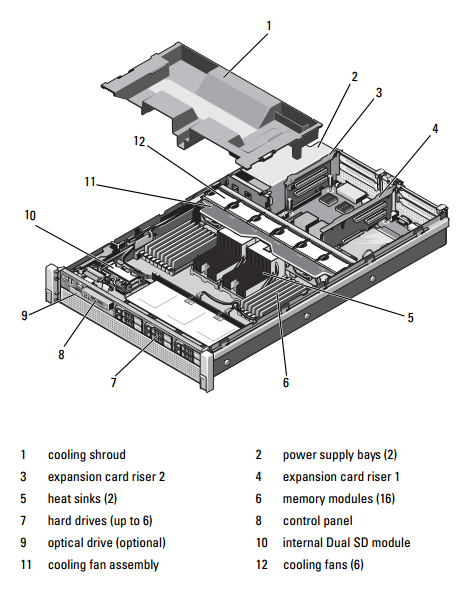
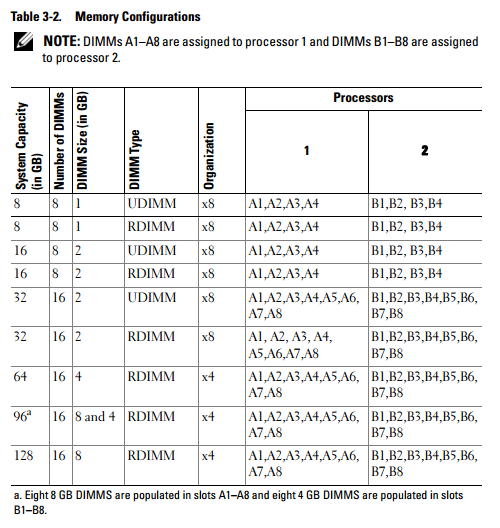
Your system supports ECC DDR3 registered DIMMs (RDIMMs) and unbuffered registered DIMMs (UDIMMs). Single-, dual- and quad-rank DIMMs of speeds up to 1333 MHz (1066 MHz for quad rank) are supported. RDIMMs of capacities 1 GB, 2 GB, 4 GB, 8 GB, and 16 GB are supported for a total of up to 256 GB. 1 GB and 2 GB UDIMMs are supported.
The system consists of 16 memory sockets split into two sets of eight sockets; one set for each processor. Each eight-memory socket set is further organized into four DDR3 memory channels. The first socket of each DDR3 memory channel is marked with a white release lever.
Each channel supports up to two single-, dual- or quad-rank RDIMMs or up to two UDIMMs.
The following features are available with respect to memory:
• Each processor has four DDR3 channels that support speeds up to 1333 MHz.
• UDIMMs and RDIMMs cannot be mixed.
• Your system may support online memory sparing.
• Up to 256 GB of memory (with 16 x 16 GB RDIMMs).
General Memory Module Installation Guidelines
To ensure optimal performance of your system, observe the following general guidelines when configuring your system memory:
NOTE: Memory configurations that fail to observe these guidelines can prevent
your system from starting and producing any video output.
• DIMMs must be populated in matched set of four or two DIMMs for each processor (for example, A1/A2, A3/A4). Single DIMM operation is not supported.
• All processor memory channels must be populated identically (same speed, size, and type).
• In case of mixed-rank population, first populate the DIMM with the
highest number of ranks (in sockets with white release levers).
• If memory modules with different speeds are installed, they operate at the
speed of the slowest installed memory module(s).
• If online sparing is enabled, identical DIMMs must be installed in the
same slots across each channel.
The system supports advanced ECC, memory interleaving, and online
sparing. For information on memory configurations, see Table 3-2.
• Mixing of memory sizes and ranks is allowed for flexibility.
• The memory configuration for each processor must be identical for optimal performance.
• Always start memory population at x1, where x is A or B. Sockets A and B correspond to processors 1 and 2 respectively.
ผู้จำหน่าย RAM, SSD, HDD & Upgrade Parts สำหรับ Server อันดับ 1 ของประเทศไทย !!
RAM and SSD -> Server, Workstation, Apple Mac, Notebook, Desktop PC : Server Options -> Processor, Memory, SAS HDD, Storage Controller, Power Supply, Spare Part
MemoryToday Co., Ltd. 7 IT-Mall Fortune Town Bldg., 3rd Floor, Room 3R22, Ratchadapisek Rd., Dindaeng, Bangkok 10400 Tel: 02-641-0055 Fax: 02-641-0066 Web site engine's code is Copyright by PHP-Nuke. All Rights Reserved. PHP-Nuke is Free Software released under the GNU/GPL license.


 คำถามถามบ่อยของกระดานข่าว
 ค้นหา
ค้นหา รายชื่อสมาชิก
 ข้อมูลส่วนตัว
 เข้าระบบ