MemoryToday.com
Memory UpgradeMemory Price ListMemory ForumsAbout MemoryToday

     LINE Chat

     Server HDD
ศูนย์รวม Hard Disk Drive สำหรับ Server รุ่นต่าง ๆ สอบถามได้ทันทีที่ Corporate Center: 02-641-0055

     Server Memory
ศูนย์รวมแรม Server และ Workstation ชนิดต่าง ๆ สอบถามได้ทันทีที่ Corporate Center: 02-641-0055

     Corporate Center
ดีลเลอร์ บริษัท องค์กร และหน่วยงานราชการ สามารถติดต่อโดยตรงไปยังกลุ่มผู้ดูแลลูกค้าพิเศษ เพื่อรับสิทธิพิเศษและเงื่อนไขการชำระเงินได้ที่ Corporate Center: 02-641-0055

     Who's Online
ขณะนี้มี 1351 บุคคลทั่วไป และ 0 สมาชิกเข้าชม

ท่านยังไม่ได้ลงทะเบียนเป็นสมาชิก หากท่านต้องการ กรุณาสมัครฟรีได้ที่นี่

     Total Hits
มีผู้เข้าเยี่ยมชม
699978446
คน ตั้งแต่ กันยายน 2547

MemoryToday.com :: ดูกระทู้ - วิธีการใส่แรม Dell PowerEdge R710
  คำถามถามบ่อยของกระดานข่าวคำถามถามบ่อยของกระดานข่าว  ค้นหาค้นหา  รายนามสมาชิกรายชื่อสมาชิก   ข้อมูลส่วนตัวข้อมูลส่วนตัว   เข้าระบบเข้าระบบ  เข้าระบบTo be member
วิธีการใส่แรม Dell PowerEdge R710

 
ตั้งกระทู้ใหม่   ตอบกระทู้    MemoryToday.com หน้ากระดานข่าวหลัก -> MemoryToday.com : RAM Server : สอบถามราคา โทร.02-641-0055 จัดส่งด่วน
ดูกระทู้ก่อนนี้ :: ดูกระทู้ถัดไป  
ผู้ส่ง ข้อความ
TIM
Site Admin
Site Admin


เข้าร่วมเมื่อ: Oct 03, 2004
ตอบ: 2529

ตอบตอบ: Mon Nov 04, 2013 8:53 pm    ชื่อกระทู้: วิธีการใส่แรม Dell PowerEdge R710 ตอบกระทู้ด้วยเครื่องหมายคำพูด(quote)

MemoryToday.com ผู้ให้บริการ "เพิ่มแรม" และผู้จำหน่าย "SSD" อันดับ 1 ของประเทศไทย !!
สอบถามราคา และ การบริการ โทร. 02-641-0055


Dell PowerEdge R710


System Memory


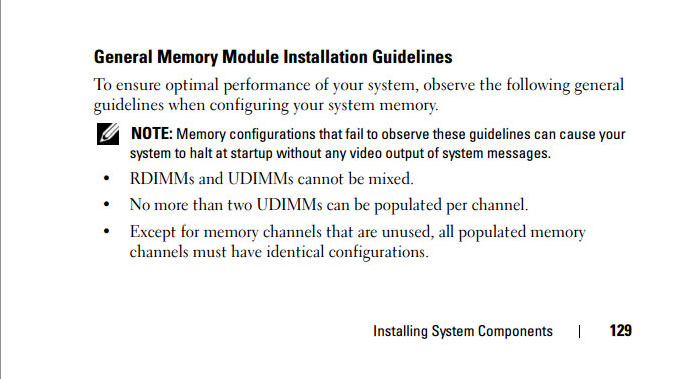
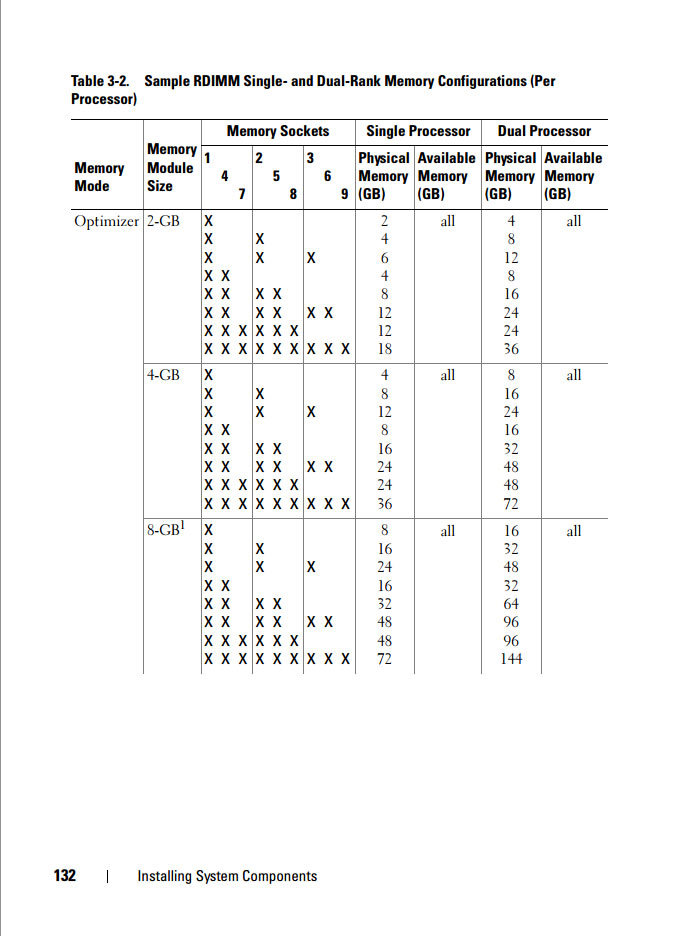
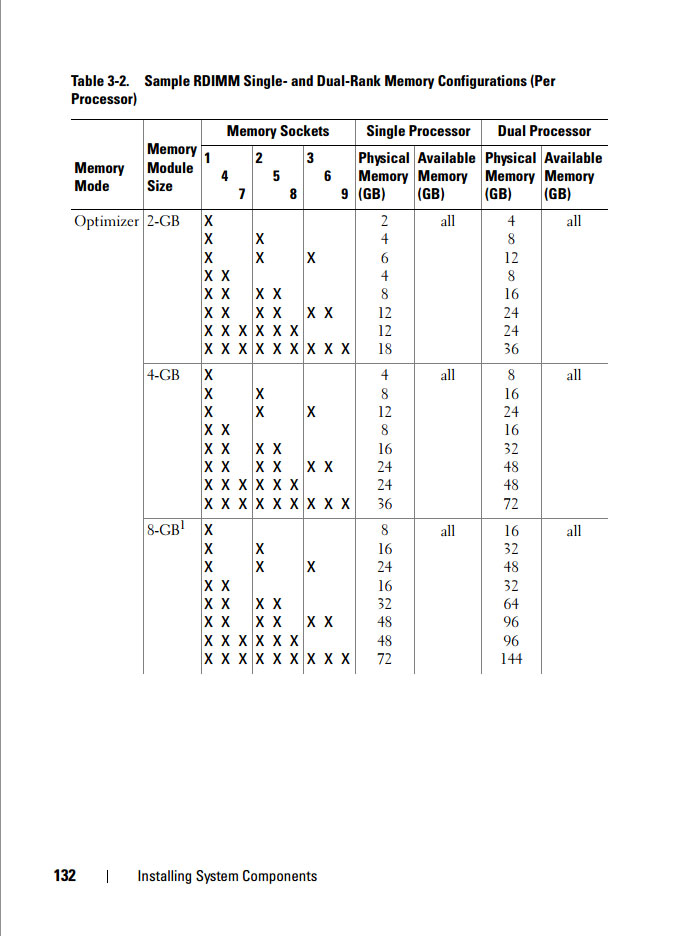
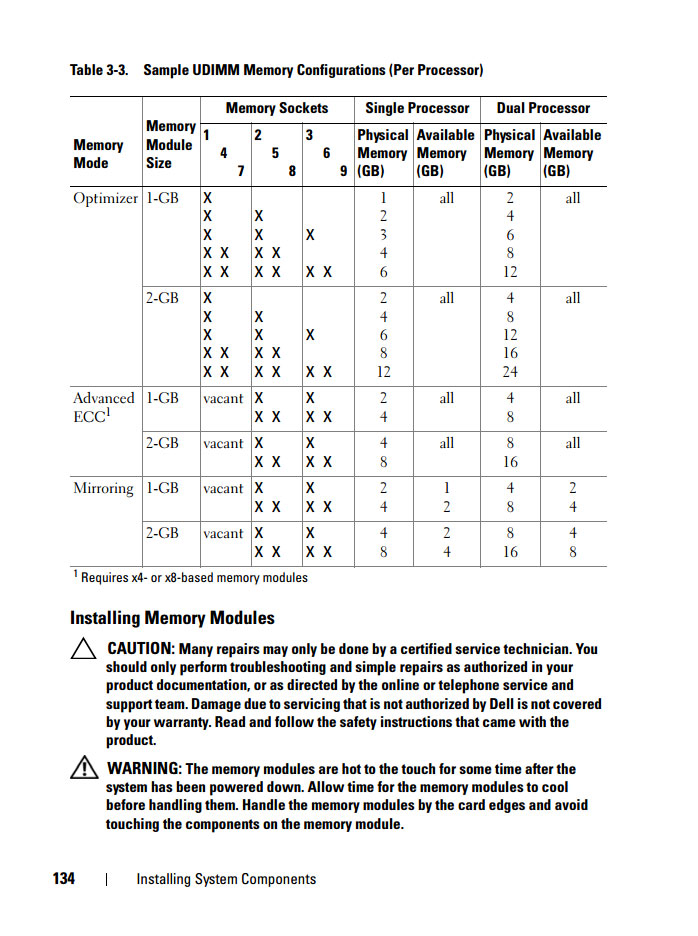
Your system supports DDR3 registered DIMMs (RDIMMs) or ECC unbuffered DIMMs (UDIMMs). Single and dual-rank DIMMs can be 1067- or 1333-MHz, and quad-rank DIMMs can be 1067-MHz.

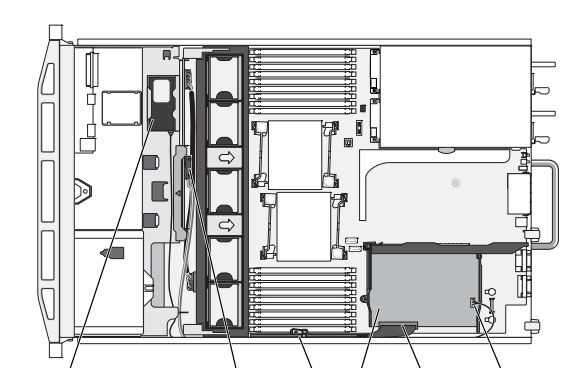
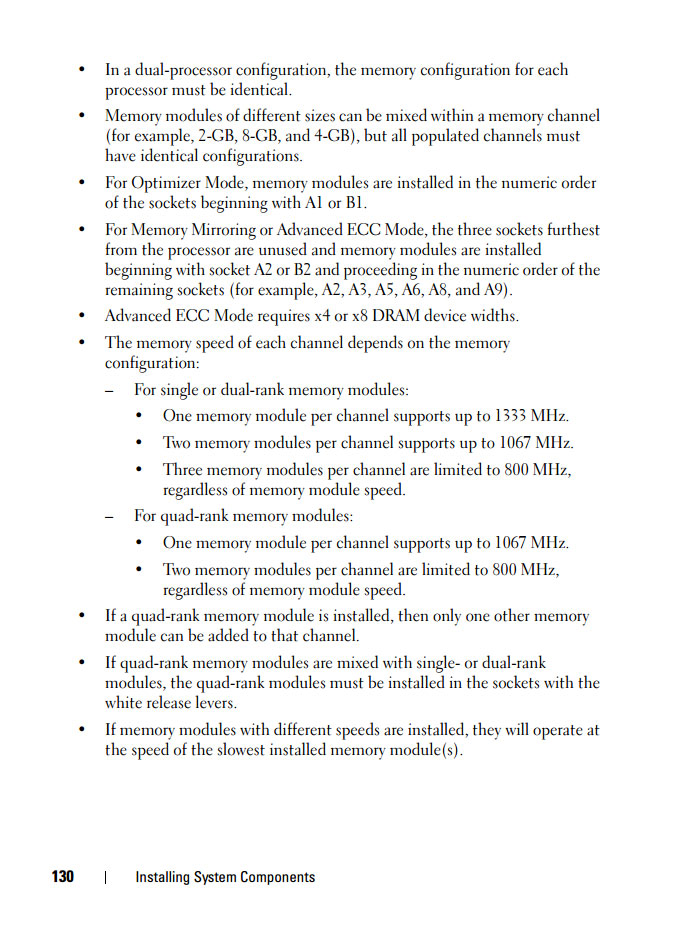
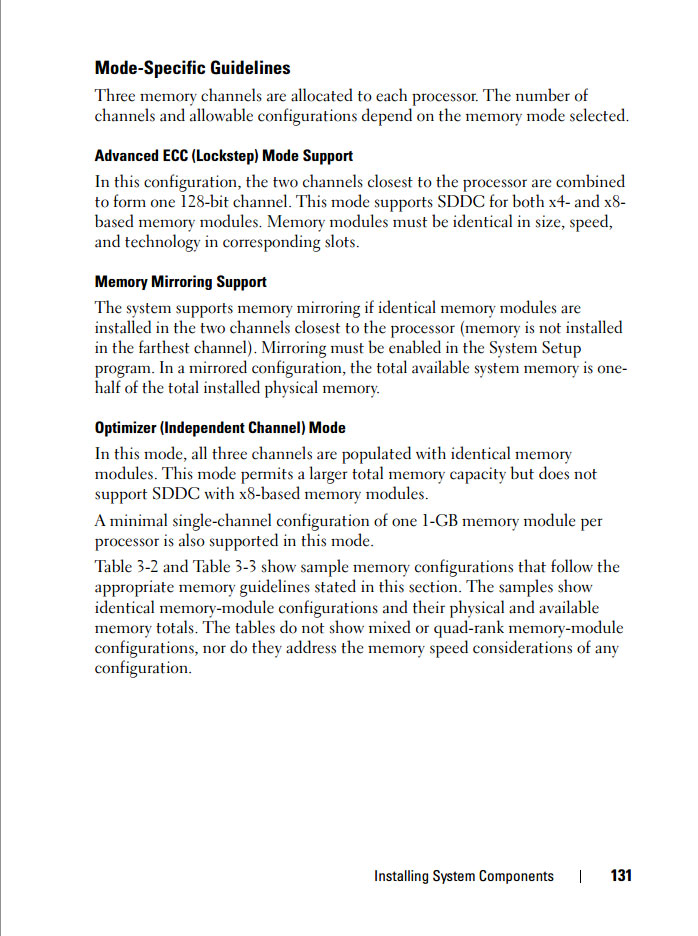
The system contains 18 memory sockets split into two sets of nine sockets, one set for each processor. Each nine-socket set is organized into three channels of three memory sockets per channel. The first socket of each channel is marked with white release levers.

The maximum memory that is supported on your system varies according to the types and sizes of memory modules being used:
• Single-rank and dual-rank RDIMMs of sizes 2-GB, 4-GB, and 8-GB (when available) are supported for a total of up to 144 GB.
• Quad-rank RDIMMs (two per channel) are supported for a total of up to 96 GB.
• 1-GB and 2-GB UDIMMs are supported for a total of up to 24 GB.


_________________
MemoryToday.com โทร.02-641-0055 / 084-959-9000
Update ราคาล่าสุด! สอบถาม/ขอใบเสนอราคา โทรมาหาเราสิครับ!

กลับไปข้างบน
แสดงข้อมูลส่วนตัวของสมาชิก เข้าชมเว็บไซต์
แสดงการตอบก่อนนี้:   
ตั้งกระทู้ใหม่   ตอบกระทู้    MemoryToday.com หน้ากระดานข่าวหลัก -> MemoryToday.com : RAM Server : สอบถามราคา โทร.02-641-0055 จัดส่งด่วน ปรับเวลา GMT + 7 ชั่วโมง
หน้า 1 จากทั้งหมด 1

 
ไปยัง:  
คุณ ไม่สามารถ ตั้งกระทู้ใหม่ในกระดานนี้
คุณ ไม่สามารถ ตอบกระทู้ในกระดานนี้
คุณ ไม่สามารถ แก้ไขการตอบกระทู้ของคุณในกระดานนี้
คุณ ไม่สามารถ ลบการตอบกระทู้ของคุณในกระดานนี้
คุณ ไม่สามารถ ลงคะแนนในแบบสำรวจในกระดานนี้
คุณ สามารถ แนบไฟล์ในกระดานข่าวนี้
คุณ สามารถ ดาวน์โหลดไฟล์ในกระดานข่าวนี้


ผู้จำหน่าย RAM, SSD, HDD & Upgrade Parts สำหรับ Server อันดับ 1 ของประเทศไทย !!
RAM and SSD -> Server, Workstation, Apple Mac, Notebook, Desktop PC : Server Options -> Processor, Memory, SAS HDD, Storage Controller, Power Supply, Spare Part
© 2004-2026 MemoryToday.com, All rights reserved.
MemoryToday Co., Ltd. 7 IT-Mall Fortune Town Bldg., 3rd Floor, Room 3R22, Ratchadapisek Rd., Dindaeng, Bangkok 10400 Tel: 02-641-0055 Fax: 02-641-0066
Web site engine's code is Copyright by PHP-Nuke. All Rights Reserved. PHP-Nuke is Free Software released under the GNU/GPL license.