System Memory
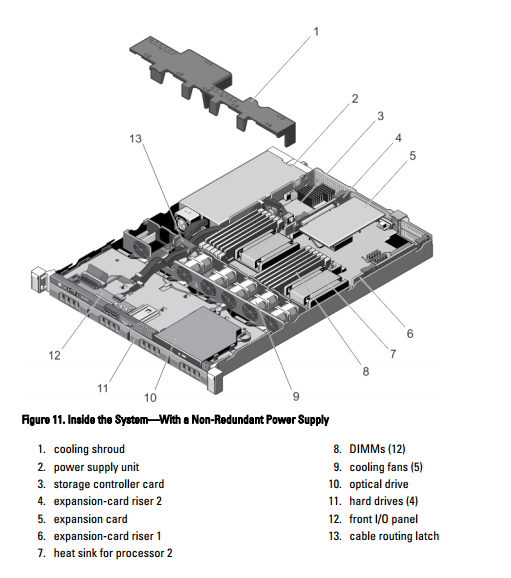
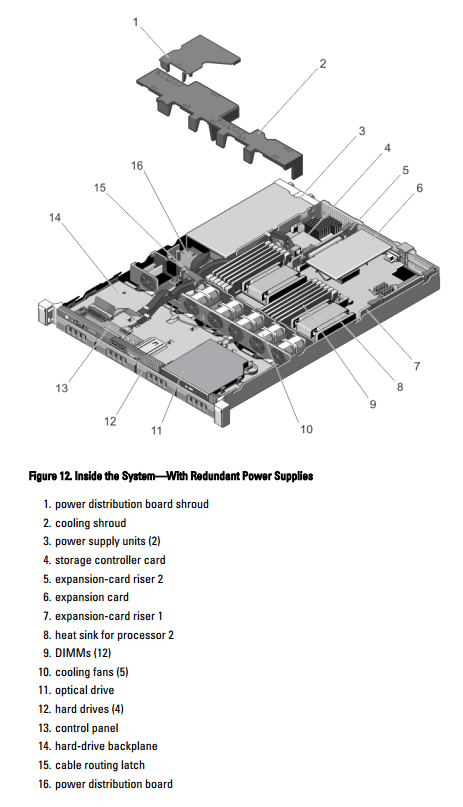
Your system supports DDR3 unbuffered ECC DIMMs (UDIMM ECC) and registered DIMMs (RDIMMs). It supports DDR3 and DDR3L voltage specifications.
NOTE: MT/s indicates DIMM speed in MegaTransfers per second.
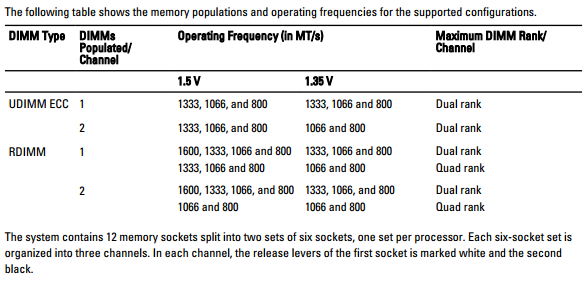
Memory bus operating frequency can be 1600 MT/s, 1333 MT/s, 1066 MT/s, or 800 MT/s depending on:
• DIMM type (UDIMM or RDIMM)
• DIMM configuration (number of ranks)
• maximum frequency of the DIMMs
• number of DIMMs populated per channel
• DIMM operating voltage
• system profile selected (for example, Performance Optimized, Custom, or Dense Configuration Optimized)
• maximum supported DIMM frequency of the processors
General Memory Module Installation Guidelines
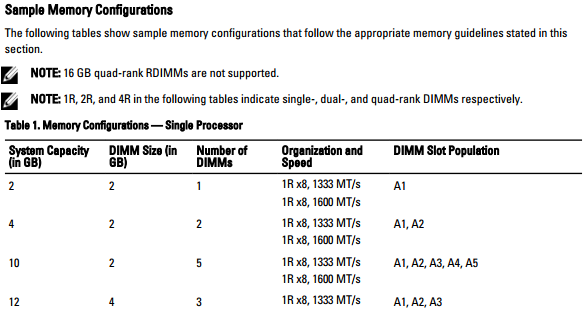
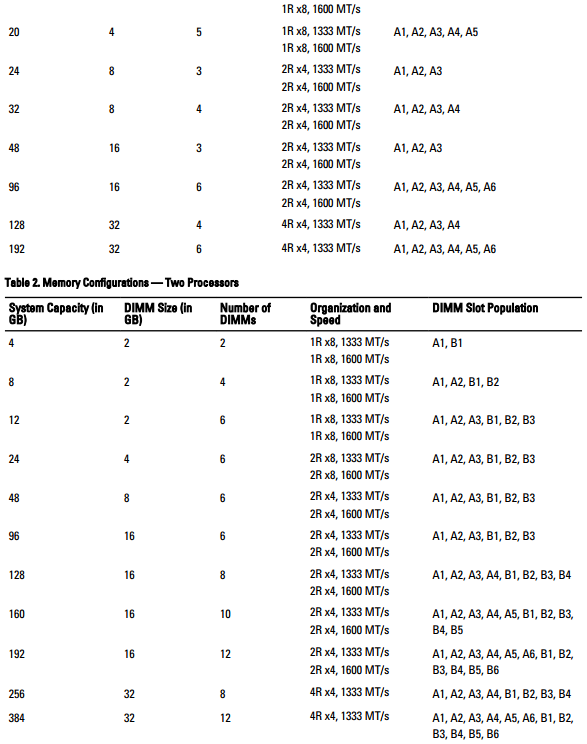
This system supports Flexible Memory Configuration, enabling the system to be configured and run in any valid chipset architectural configuration. The following are the recommended guidelines for best performance:
• UDIMMs and RDIMMs must not be mixed.
• x4 and x8 DRAM based DIMMs can be mixed. For more information, see Mode-Specific Guidelines.
• A maximum of two UDIMMs can be populated in a channel.
• A maximum of two quad-rank RDIMMs can be populated in a channel.
• A maximum of two single- or dual-rank RDIMMs can be populated in a channel.
• One quad-rank RDIMM and one single- or dual-rank RDIMM can be populated per channel.
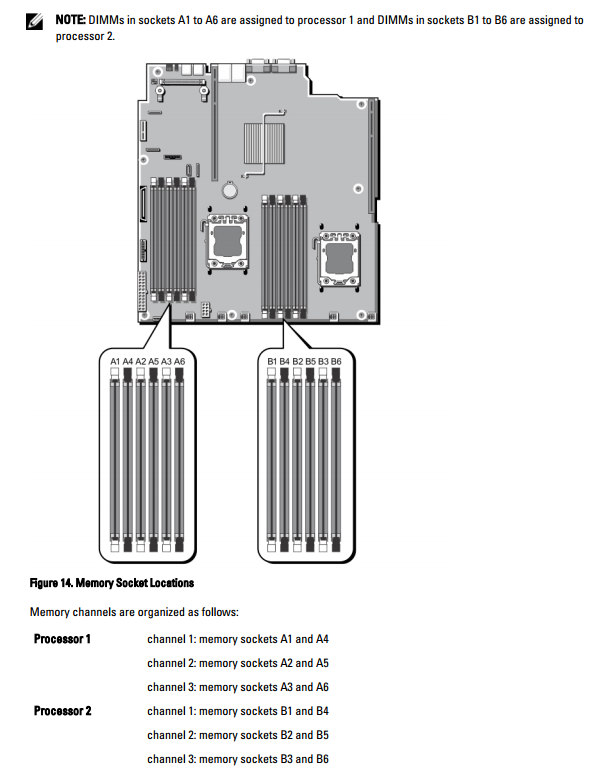
• Populate DIMM sockets only if a processor is installed. For single-processorsystems, sockets A1 to A6 are available. For dual-processor systems, sockets A1 to A6 and sockets B1 to B6 are available.
• Populate all sockets with white release tabs first and then black.
• Populate the sockets by highest rank count in the following order - first in sockets with white release levers and then black. For example, if you want to mix quad-rank and dual-rank DIMMs, populate quad-rank DIMMs in the sockets with white release tabs and dual-rank DIMMs in the sockets with black release tabs.
• In a dual-processor configuration, the memory configuration for each processor must be identical. For example, if you populate socket A1 for processor 1, then populate socket B1 for processor 2, and so on.
• Memory modules of different sizes can be mixed provided that other memory population rules are followed (for example, 2 GB and 4 GB memory modules can be mixed).
• Depending on mode-specific guidelines, populate two or three DIMMs per processor (one DIMM per channel) at a time to maximize performance. For more information, see Mode-Specific Guidelines.
• If memory modules with different speeds are installed, they will operate at the speed of the slowest installed memory module(s) or slower depending on system DIMM configuration.
Mode-Specific Guidelines
Three memory channels are allocated to each processor. The allowableconfigurations depend on the memory mode selected.
NOTE: x4 and x8 DRAM based DIMMs can be mixed providing support for (Reliability, Availability, and Serviceability) RAS features. However, all guidelines for specific RAS features must be followed. x4 DRAM based DIMMs retain Single Device Data Correction (SDDC) in either memory optimized (independent channel) or Advanced ECC modes. x8 DRAM based DIMMs require Advanced ECC mode to gain SDDC.
The following sections provide additional slot population guidelines for each mode.
Advanced ECC (Lockstep)
Advanced ECC mode extends SDDC from x4 DRAM based DIMMs to both x4 and x8 DRAMs. This protects against single DRAM chip failures during normal operation.
Memory installation guidelines:
• Memory sockets A1, A4, B1, and B4 are disabled and do not supported Advanced ECC mode.
• DIMMs must be installed in matched pairs — DIMMs installed in memory sockets (A2, B2) must match DIMMs installed in memory sockets (A3, B3) and DIMMs installed in memory sockets (A5, B5) must match DIMMs installed in memory sockets (A6, B6).
NOTE: Advanced ECC with mirroring is not supported.
Memory Optimized (Independent Channel) Mode
This mode supports SDDC only for memory modules that use x4 device width and does not impose any specific slot population requirements.
Memory Sparing
NOTE: To use memory sparing, this feature must be enabled in the System Setup.
In this mode, one rank per channel is reserved as a spare. If persistent correctable errors are detected on a rank, the data from this rank is copied to the spare rank and the failed rank is disabled.
With memory sparing enabled, the system memory available to the operating system is reduced by one rank per channel. For example, in a system with three 8 GB dual-rank DIMMs, the available system memory is: 1/2 (ranks/channel) × 3 (DIMMs) × 8 GB = 12 GB, and not 3 (DIMMs) × 8 GB = 24 GB.
NOTE: Memory sparing does not offer protection against a multi-bit uncorrectable error.
NOTE: Both Advanced ECC/Lockstep and Optimizer modes support Memory Sparing.
Memory Mirroring
Memory Mirroring offers the strongest DIMM reliability mode compared to all other modes, providing improved uncorrectable multi-bit failure protection. In a mirrored configuration, the total available system memory is one half of the total installed physical memory. Half of the installed memory is used to mirror the active DIMMs. In the event of an uncorrectable error, the system will switch over to the mirrored copy. This ensures SDDC and multi-bit protection.
Memory installation guidelines:
NOTE: The first memory channel for each processor (Channel 1) is disabled and not available for Memory Mirroring.
• Memory channels 2 and 3 must be populated.
• Memory modules must be identical in size, speed, and technology.
• DIMMs installed in memory sockets with white release tabs must be identical and similar rule applies for sockets with black release tabs. For example, DIMMs installed in sockets A2 and A3 must be identical.
ผู้จำหน่าย RAM, SSD, HDD & Upgrade Parts สำหรับ Server อันดับ 1 ของประเทศไทย !!
RAM and SSD -> Server, Workstation, Apple Mac, Notebook, Desktop PC : Server Options -> Processor, Memory, SAS HDD, Storage Controller, Power Supply, Spare Part
MemoryToday Co., Ltd. 7 IT-Mall Fortune Town Bldg., 3rd Floor, Room 3R22, Ratchadapisek Rd., Dindaeng, Bangkok 10400 Tel: 02-641-0055 Fax: 02-641-0066 Web site engine's code is Copyright by PHP-Nuke. All Rights Reserved. PHP-Nuke is Free Software released under the GNU/GPL license.


 คำถามถามบ่อยของกระดานข่าว
 ค้นหา
ค้นหา รายชื่อสมาชิก
 ข้อมูลส่วนตัว
 เข้าระบบ