Your system supports DDR3 registered DIMMs (RDIMMs) or unbuffered ECC DIMMs (UDIMMs). Single and dual-rank DIMMs can be 1067- or 1333-MHz, and quad-rank DIMMs can be 800- or 1067-MHz.
Your system supports single-channel mode and dual-channel mode.
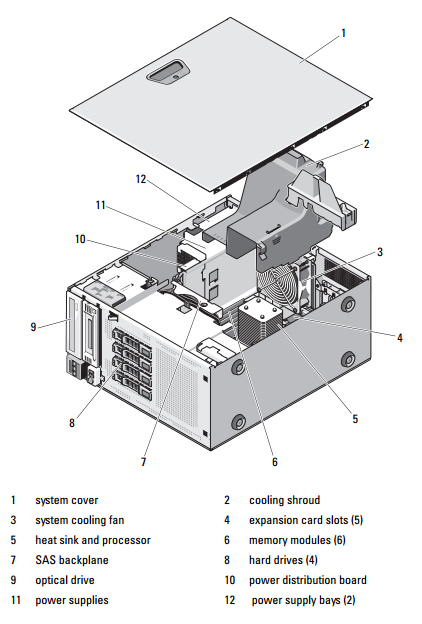
The system contains a total of six memory sockets. UDIMM supports single-rank and dual-rank DIMMs. Only RDIMM supports quad-rank DIMMs.
The maximum memory that is supported on your system varies according to the types and sizes of memory modules being used:
• Single-rank and dual-rank RDIMMs of sizes 2-GB, 4-GB and 8-GB are supported for a total of up to 24 GB.
• Quad-rank RDIMMs are supported for a total of up to 32 GB.
• 1-GB and 2-GB UDIMMs are supported for a total of up to 8 GB.
General Memory Module Installation Guidelines
To ensure optimal performance of your system, observe the following general
guidelines when configuring your system memory.
NOTE: Memory configurations that fail to observe these guidelines can prevent
your system from starting and producing any video output.
• RDIMMs and UDIMMs cannot be mixed.
• Except for memory channels that are unused, all populated memory channels must have identical configurations.
• Memory modules of different sizes can be mixed in A1-A3 or B1-B3
(for example, 2-GB and 4-GB), but all populated channels must have
identical configurations.
• The memory speed of each channel depends on the memory configuration:
– For single- or dual-rank memory modules:
• One memory module per channel supports up to 1333 MHz.
• Two memory modules per channel support up to 1333 MHz.
• Three memory modules per channel support up to 800 MHz.
– For quad-rank memory modules:
• One memory module per channel supports up to 1067 MHz.
• Two memory modules per channel are limited to 800 MHz, regardless of memory module speed.
• If quad-rank memory modules are mixed with single- or dual-rank modules, the quad-rank modules must be installed in the sockets with the white release levers.
• If memory modules with different speeds are installed, they will operate at the speed of the slowest installed memory module(s).
Mode-Specific Guidelines
There are two memory channels with each channel supporting a maximum of three RDIMMs and two UDIMMs.
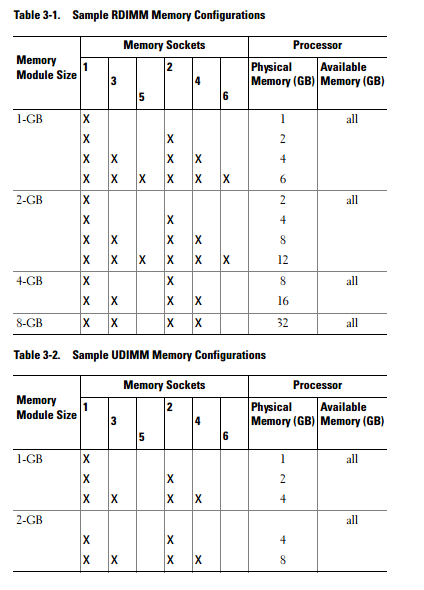
Table 3-1 and Table 3-2 show sample memory configurations that follow the appropriate memory guidelines stated in this section. The samples show identical memory-module configurations and the physical and available memory totals. The tables do not show mixed or quad-rank memory-module configurations, nor do they address the memory speed considerations of any configuration.
ผู้จำหน่าย RAM, SSD, HDD & Upgrade Parts สำหรับ Server อันดับ 1 ของประเทศไทย !!
RAM and SSD -> Server, Workstation, Apple Mac, Notebook, Desktop PC : Server Options -> Processor, Memory, SAS HDD, Storage Controller, Power Supply, Spare Part
MemoryToday Co., Ltd. 7 IT-Mall Fortune Town Bldg., 3rd Floor, Room 3R22, Ratchadapisek Rd., Dindaeng, Bangkok 10400 Tel: 02-641-0055 Fax: 02-641-0066 Web site engine's code is Copyright by PHP-Nuke. All Rights Reserved. PHP-Nuke is Free Software released under the GNU/GPL license.


 คำถามถามบ่อยของกระดานข่าว
 ค้นหา
ค้นหา รายชื่อสมาชิก
 ข้อมูลส่วนตัว
 เข้าระบบ